
Before you start
- If you don’t have a saved card, have one ready. You may be asked for it when you upgrade.
Steps
- In the sidebar, select Settings, then Subscription. The Subscription page opens in its own tab. The top shows your current plan and price, when it next bills, and the card it bills to, with Billing history alongside.
- Under Find the right plan for your practice, choose monthly or annual billing. You can also switch the currency shown.
- On the plan you want, select its button:
- Upgrade to [plan]: a bar shows the amount Due today (prorated). Select Confirm upgrade.
- Downgrade: in the Downgrade plan window, select CONFIRM DOWNGRADE. To stop, select Keep Subscription.
- If you’re asked for card details, enter them to finish.
- When you see Upgrade Successful!, select CLOSE.
Add an add-on
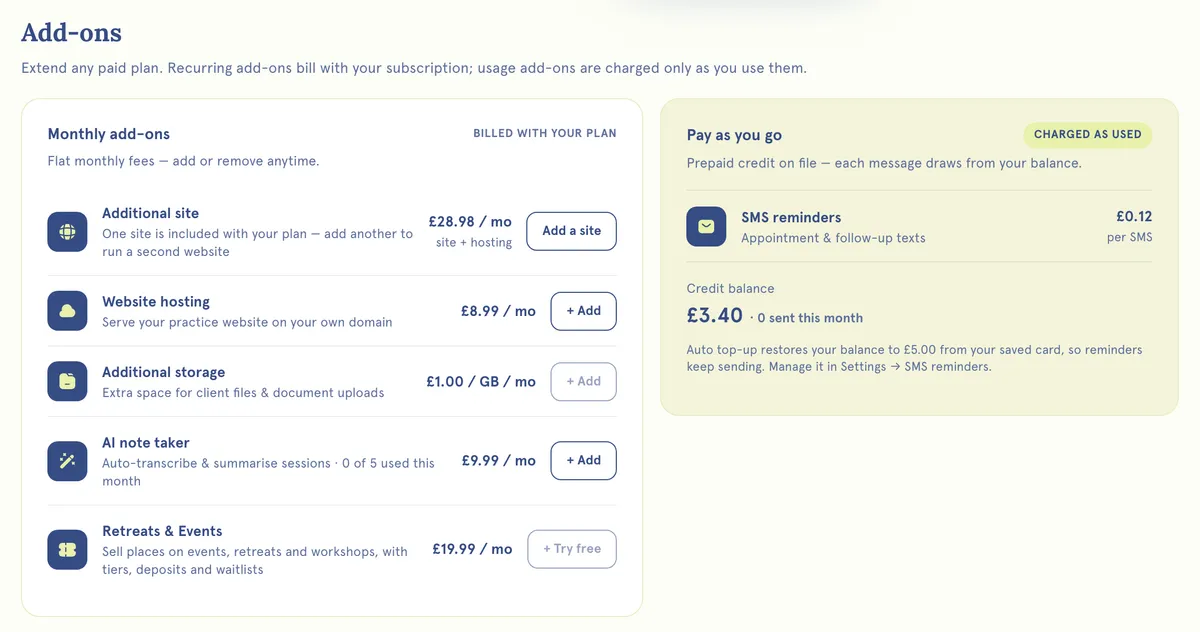
- Scroll down to Add-ons.
- Under Monthly add-ons you’ll find Additional site, Website hosting, Additional storage, AI note taker and Retreats & Events, each with its monthly price. Ones you already have show Added, with Remove beside them; Additional site has Manage. Under Pay as you go, SMS reminders is charged per message as you use it.
- For storage, choose from 1 to 20 GB and select Confirm. For hosting and the AI note taker, you go to a secure payment page.
- For Additional site, select Add a site. This opens your website list.
What happens next
Pricing, billing and any discounts depend on your plan and billing country. You’ll see the details in Settings → Subscription before you confirm. Add-ons you buy show Added.
Good to know
- Additional storage is only available on paid plans.
- To remove an add-on, select Remove, then Remove add-on. Add-ons need 30 days’ notice. They stay active until the date shown.
- Removing storage doesn’t delete your files. Removing the AI note taker keeps the notes you already have.
- Add-on pricing depends on your plan and billing country. You’ll see it in Settings → Subscription before you confirm. If an add-on isn’t available for your account or currency, the app tells you.
- On a free trial, you can convert to paid early with Confirm & upgrade to [plan]. If you have questions about what you’ll be charged, contact our support team and we’ll help.
Troubleshooting
My payment failed when I tried to upgrade. Check the card has funds and allows online payments, including international ones. If it still fails, try another card or ask your bank.
How do I close my account? There’s no option in the app to delete your account. To cancel your plan, sign in and go to Settings → Subscription. Cancelling needs 30 days’ notice. If you have questions about closing your account or about charges, contact our support team and we’ll help.